Business management software

NeeTron MyERP Solution

Manage workforce records, attendance, payroll and purchasing alongside office tasks and connected-device monitoring.

Explore the modules below, then discuss the workflows and configuration your organization needs with our team.

MyERP opens in a new tab and currently uses HTTP, not an encrypted HTTPS connection. Avoid entering passwords or sensitive information over an untrusted network.

Explore your workspace

People, business and devices

A dashboard with module shortcuts, T-code search, favorites and a notice board.

Workforce

HR and personnel administration

Keep employee records organized and review assigned tasks, departments and device status through dedicated screens.

HR

Employee Master, task creation, employee assignment and task completion provide a workspace for day-to-day staff tasks.

  • Task Age Graph and Pending Task Aging
  • Employee Task Reports
  • Subscription Cost Report
View additional menu

An Aadhaar Scanner entry is shown in the HR menu. Discuss its use and handling of identity data with our team before deployment.
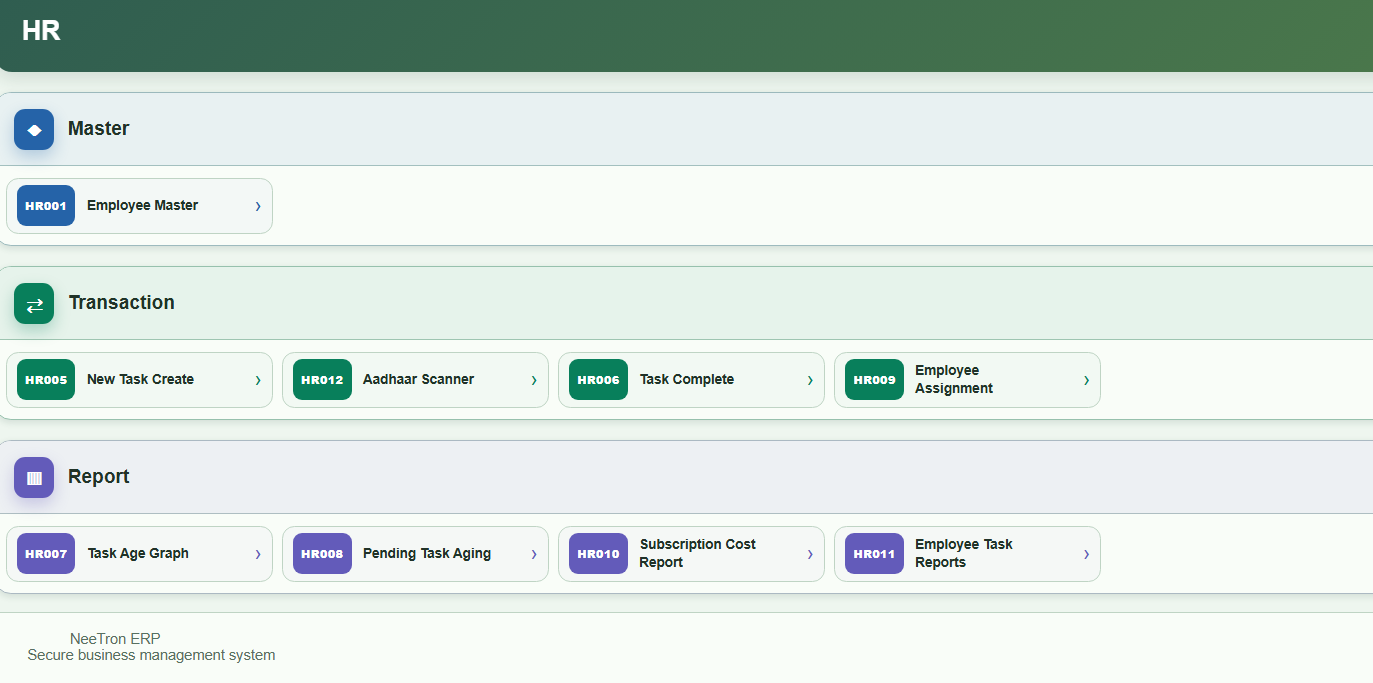
MyERP HR menu showing employee master, task transactions and reports
HR workspace · select the image to enlarge

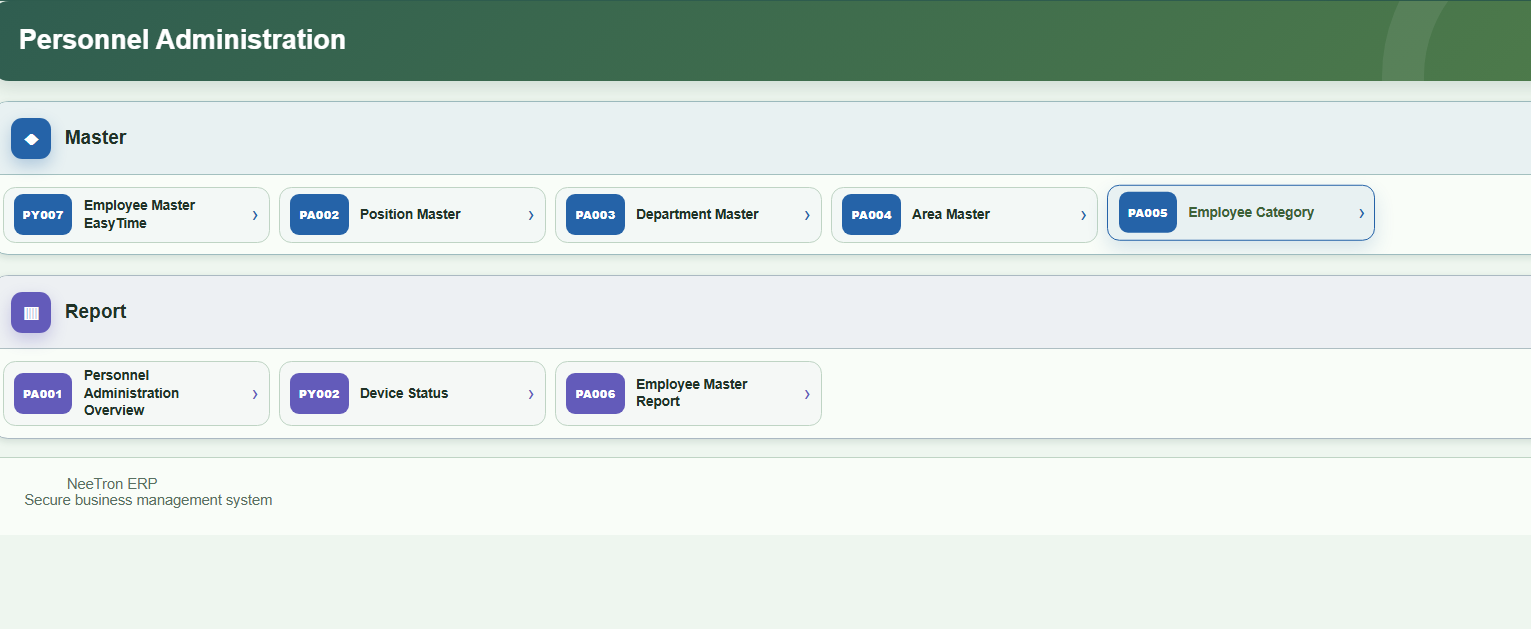
Personnel administration

Define the employee structure using position, department, area and employee category masters.

  • Employee Master EasyTime
  • Personnel Administration Overview
  • Employee Master Report and Device Status
Personnel administration menu with organizational masters and employee reports
Personnel administration workspace

Time management

Attendance rules, shifts and reporting

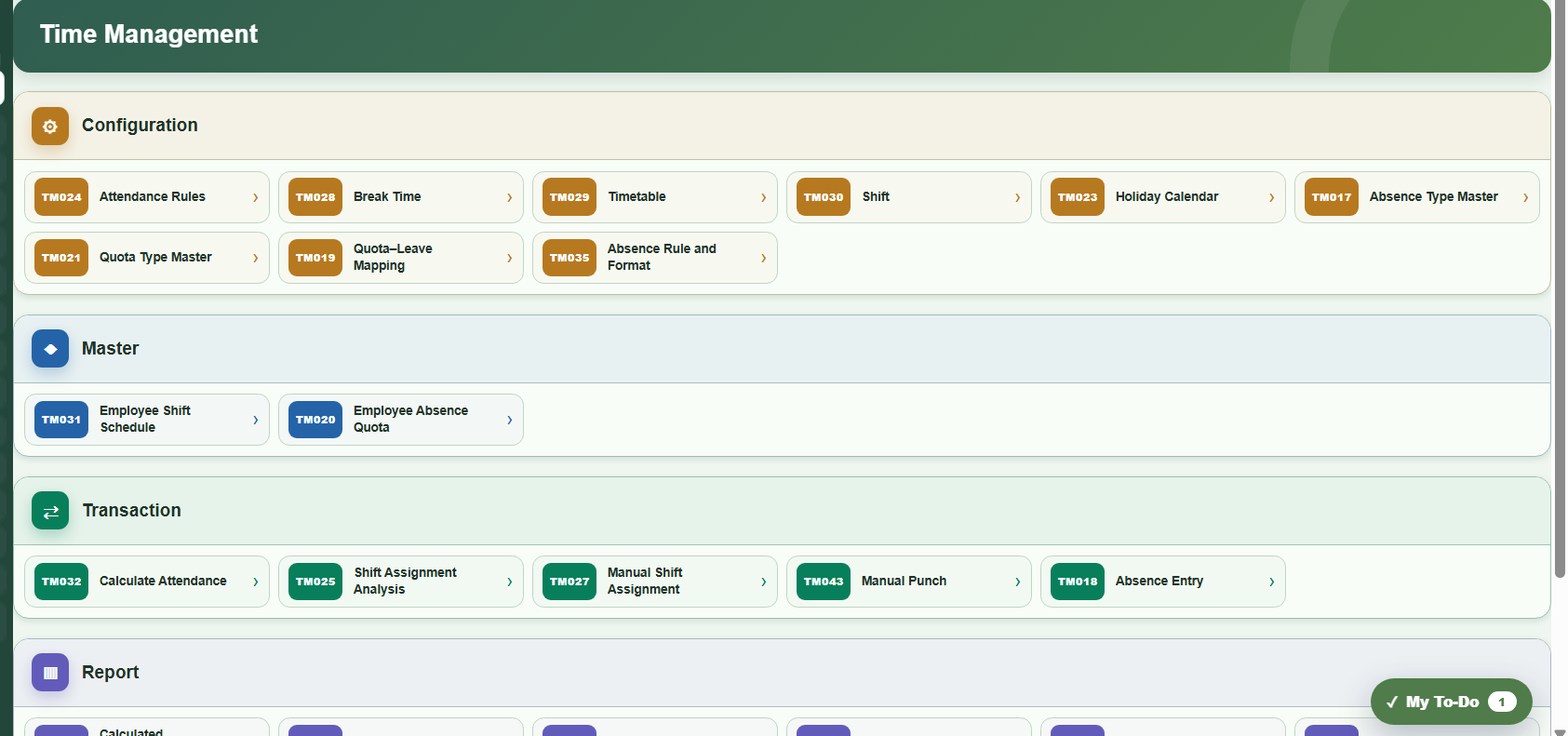
Configure working patterns and absence rules, manage employee schedules, and review attendance results.

Configuration

Attendance Rules, Break Time, Timetable, Shift and Holiday Calendar.

Absence Type Master, Quota Type Master, Quota–Leave Mapping, and Absence Rule and Format.

Schedules and entries

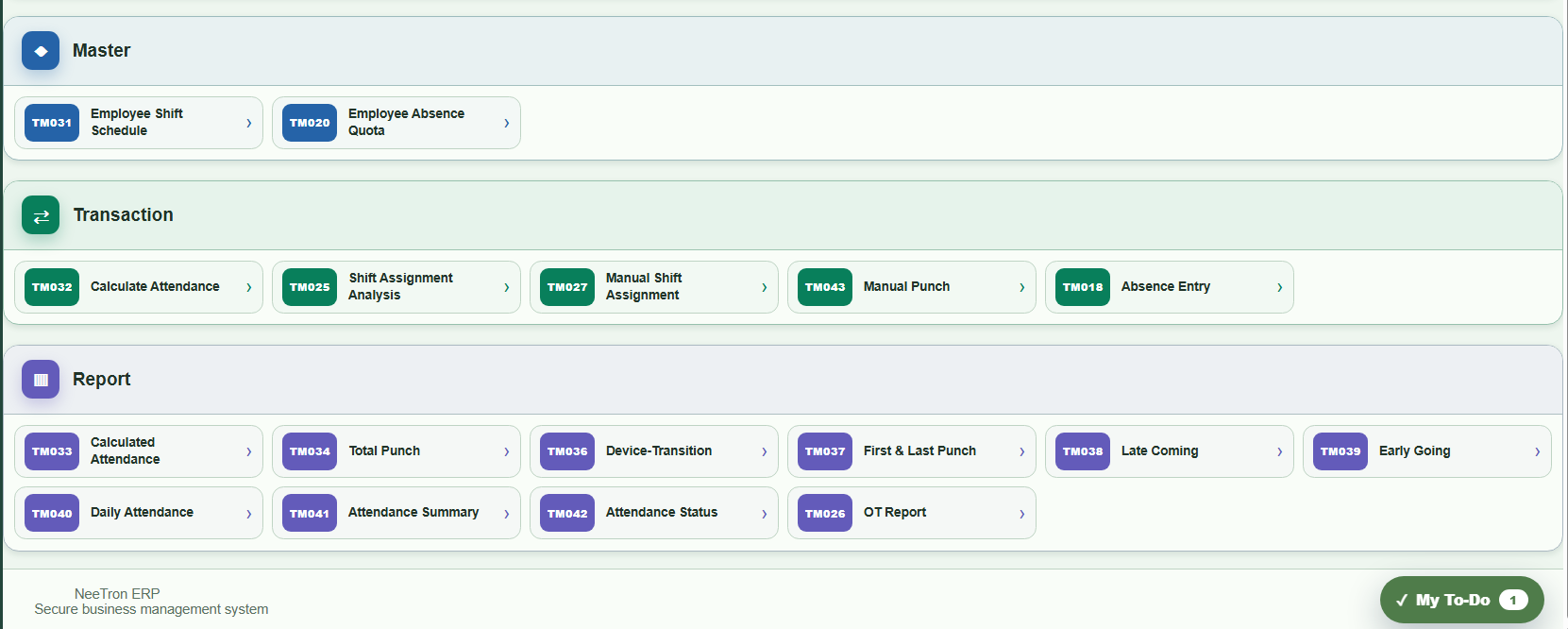
Employee Shift Schedule and Employee Absence Quota.

Calculate Attendance, Shift Assignment Analysis, Manual Shift Assignment, Manual Punch and Absence Entry.

Reports

Calculated Attendance, Total Punch, Device-Transition, First & Last Punch, Late Coming, Early Going, Daily Attendance, Attendance Summary, Attendance Status and OT Report.

Time management configuration, employee schedules and attendance transactions
Rules and attendance transactions
Attendance report menu including late coming, early going, daily attendance and overtime
Attendance reporting workspace

Payroll

Salary processing and payslips

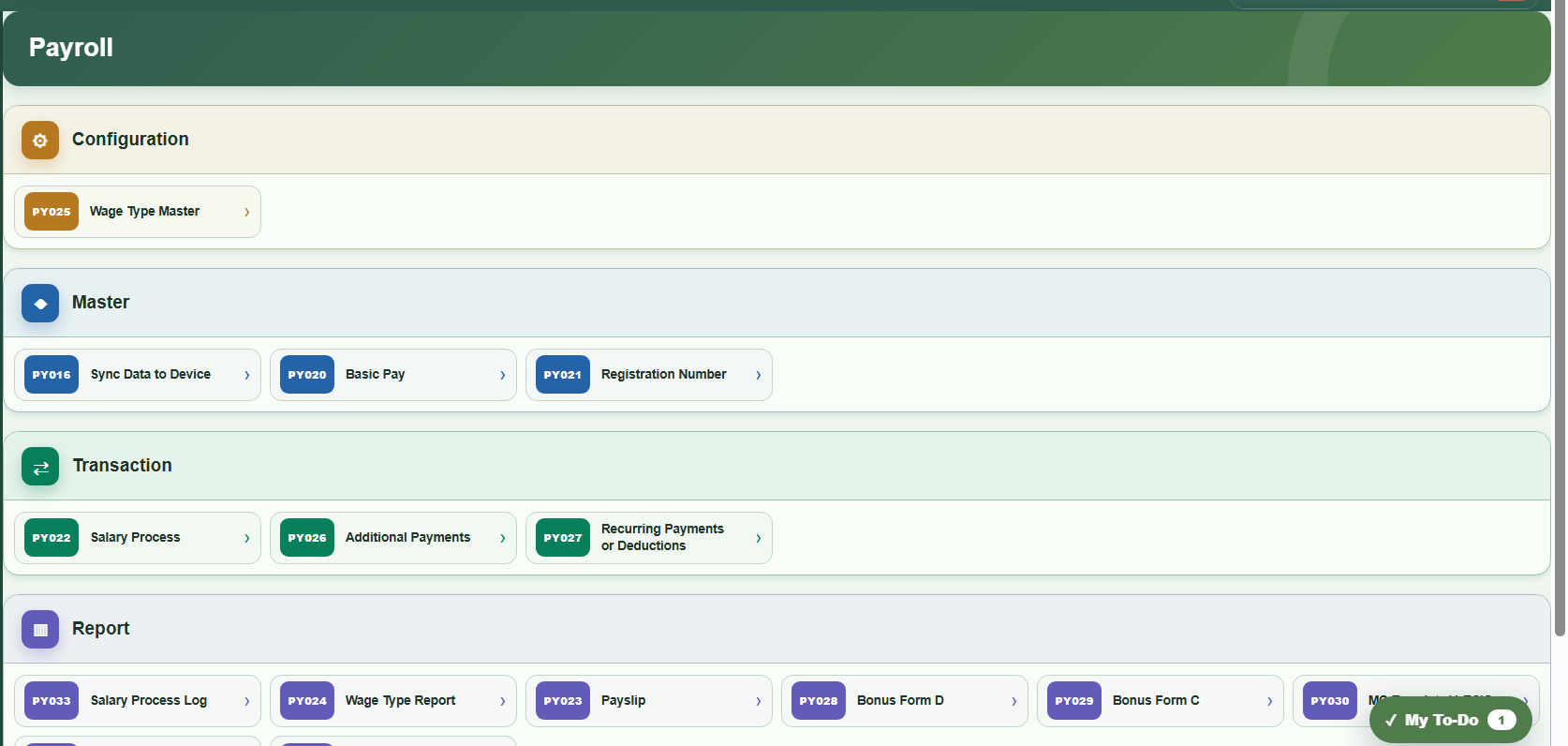
Maintain wage types and basic pay records, then work with salary processing and payment adjustments.

  • Wage Type Master, Basic Pay and Registration Number
  • Salary Process and Additional Payments
  • Recurring Payments or Deductions
  • Salary Process Log, Wage Type Report and Payslip
  • Bonus Form C and Bonus Form D report menus

Confirm payroll rules, statutory requirements and report formats for your organization during the demo.

Payroll menu showing wage configuration, salary processing, adjustments and payslip reports
Payroll workspace

Business operations

Purchase and commercial records

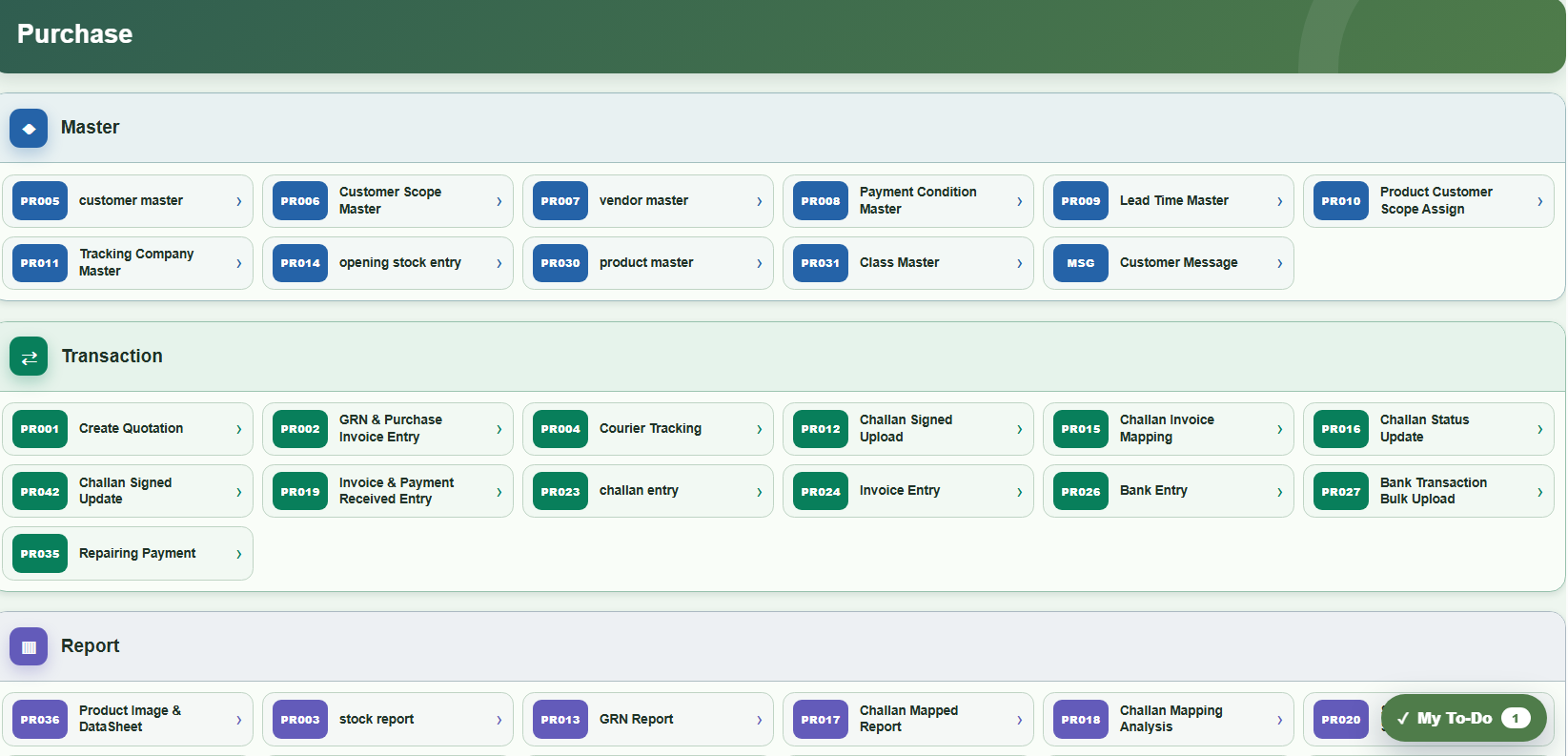
A dedicated workspace groups customer and vendor records with quotations, goods receipt, challans, invoices and payment entries.

Masters

Customer, vendor, product and class masters; customer scope, payment conditions, lead time and tracking company records.

Transactions

Create Quotation, GRN & Purchase Invoice Entry, Courier Tracking, challan entry and signed challan updates.

Challan Invoice Mapping, Invoice Entry, Invoice & Payment Received Entry, Bank Entry and Bank Transaction Bulk Upload.

Reports

Stock, GRN, Challan Mapped Report, Challan Mapping Analysis, and Product Image & DataSheet.

Purchase menu with customer and vendor masters, quotations, GRN, challans, invoices and reports
Purchase workspace

Office Desk

Notice boards, reminders and tasks

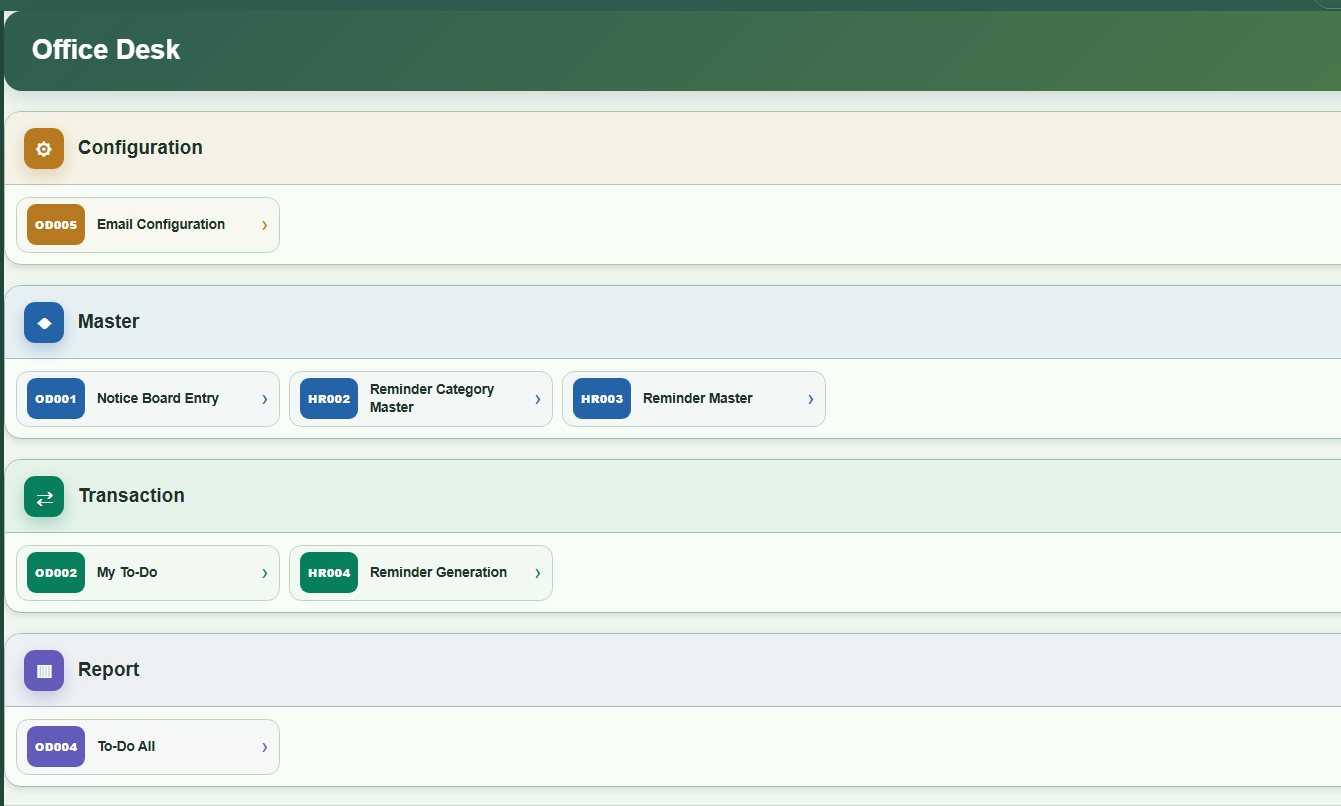
Keep office communication and follow-up activities in dedicated menus.

  • Email Configuration
  • Notice Board Entry
  • Reminder Category Master and Reminder Master
  • My To-Do and Reminder Generation
  • To-Do All report
Office Desk menu showing notices, reminders, email configuration and to-do tasks
Office Desk workspace

Android application · Early Access

NeeTron ERP mobile application

Explore canteen item management and image-based billing alongside your MyERP solution. The Android app is shown as Early Access on Google Play; contact our team for current access and setup requirements.

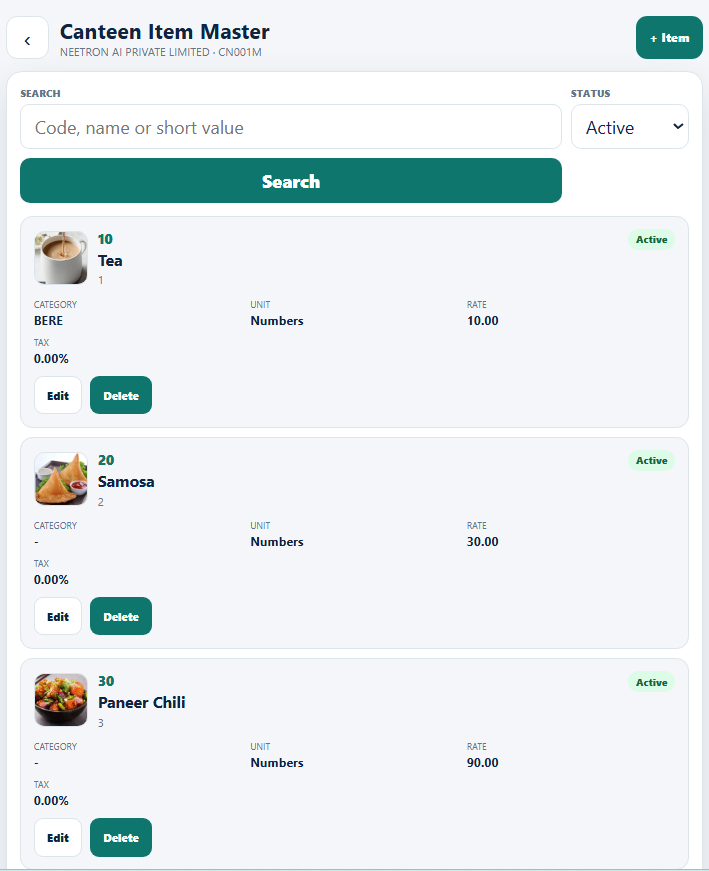
Canteen item catalogue

Search items by code, name or short value and filter by status. Item cards show a photo, category, unit, rate and tax, with add, edit and delete controls.

Canteen Item Master · CN001M

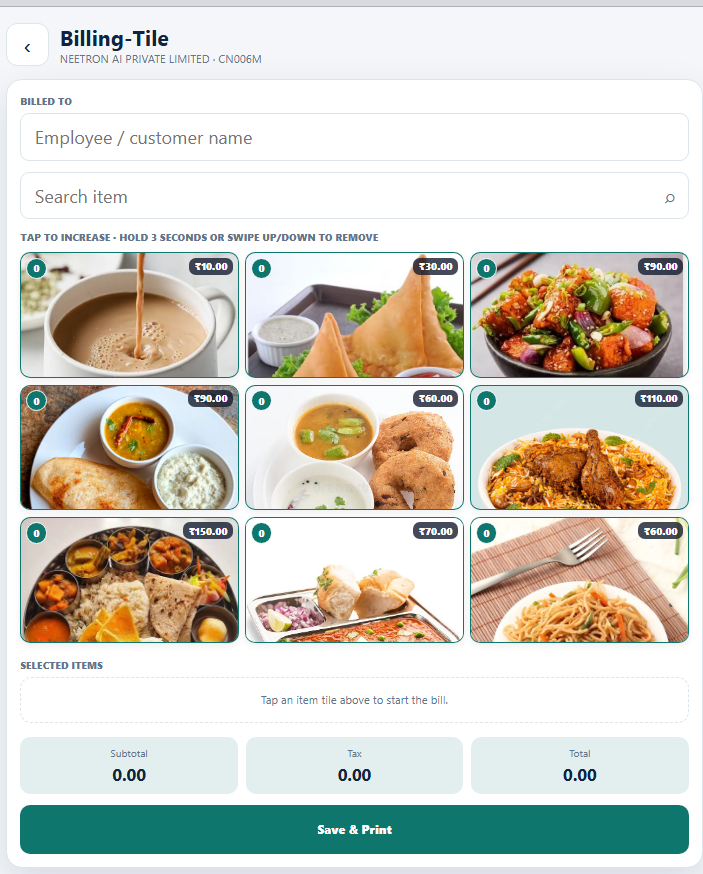
Tile-based billing

Enter an employee or customer name, search the catalogue and select items using photo tiles. The screen shows quantity controls, selected items, subtotal, tax and total, plus Save & Print.

Billing-Tile · CN006M

Billing reports

Filter by date range and search by bill, billed-to name, item or user. Choose bill-wise, date-wise, item-wise or user-wise views, with bill count, quantity, tax and total summaries.

Billing Report · CN007M

Discuss your mobile workflow

The reporting screen distinguishes Online and Offline mobile bill sources. Ask our team to demonstrate offline operation, synchronization, printer compatibility and user permissions for your deployment.

Catalogue prices shown in the screenshots are item values, not app subscription pricing. Early Access availability and supported modules may change.

Request Android app access

Contact our team to confirm Early Access eligibility and receive the official installation link.

Canteen item catalogue with search, status filters and photographed item cards
Canteen Item Master · enlarge to view controls
Photo tile billing screen with item search, totals and Save and Print
Tile-based canteen billing

Connected operations

IoT temperature and humidity monitoring

The IoT workspace includes temperature and humidity reports, device configuration and dashboards for monitoring connected devices.

Monitoring views

  • Temperature and humidity gauges and trend views
  • Two-device and three-device monitoring menus
  • H&T Report, T Dashboard and NodeMCU Report
  • IoT device configuration and other IoT reports

Device context

Dashboard fields show device status, last update, power source, power hours over the last 24 hours and temperature alert status.

Discuss sensor compatibility, update frequency and alert configuration with our team. Device addresses and network identifiers are not displayed in this public overview.

A workspace users can personalize

Quick Open accepts a T-code or page name. Favorites provide shortcuts, and the dashboard includes a notice board with English and Hindi text.

Profile controls include theme, font and font size choices, along with Hindi voice, tone and speed preferences. Email Configuration is also accessible from the profile.

Additional dashboard modules

The dashboard also lists these modules. Ask our team to demonstrate the areas relevant to your business.

AdminNetwork AssetsFinanceBusinessPartnerProductionCanteen Management System

See MyERP for your organization

Tell us which modules you need, your workforce size, current attendance devices and the reports you use. We can discuss configuration, migration requirements and deployment options.

Screens illustrate the interface. Module availability, integrations and configuration are confirmed during your demonstration.